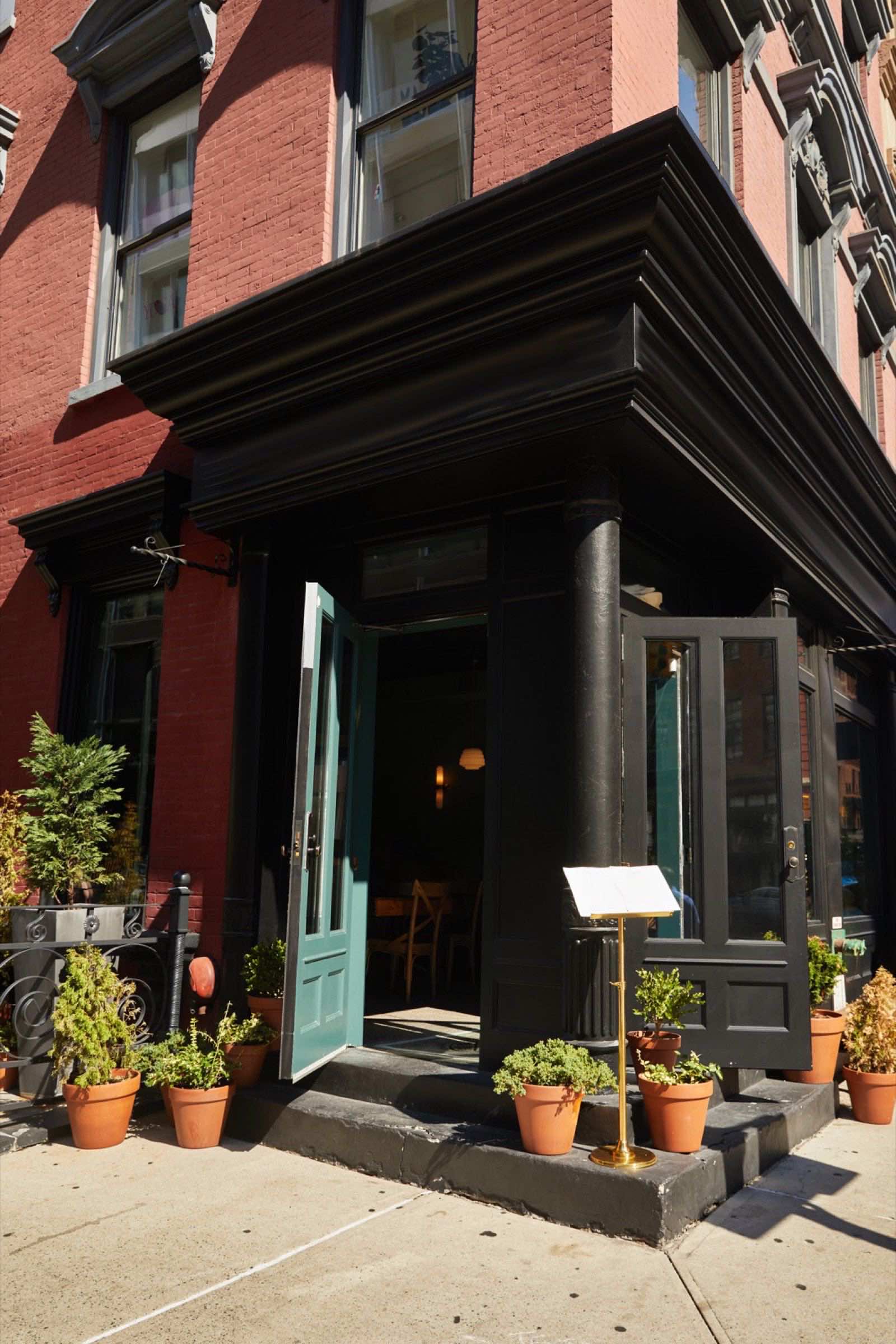
Real photos beat stock photos. Every time.
Nobody believes the smiling handshake people work at a dental office on Avenue U. Here's the shot list, the phone settings, the words to ask permission, and how to prep the files.


You've seen those websites: perfect teeth, a glass office, a handshake in front of a laptop, a woman laughing at a salad. Nobody believes those people work at a dental office on Avenue U or a tire shop on Coney Island Avenue. Customers know a stock photo on sight, and what it tells them is "we didn't have anything real to show you". This guide gives you the exact list of photos your business needs, how to shoot them with the phone in your pocket, what to say to the customer or employee you want in the frame, and how to prepare the files so they don't slow your site down. Ten honest photos beat one perfect one.
Why real photos win
A customer looking at your site isn't choosing a website. They're choosing whether to walk into your place. They have questions they'd never say out loud. Is it clean? Is it busy or dead? Do people like me go there? Does the work look good? Will I recognize it from the street? Can I see the owner's face? Real photos answer every one of those in a second. Stock photos answer none of them, and they quietly say "we're hiding something".
Real photos also do work you don't see. Google shows your images in search results and on your Business Profile, and a photo of your actual storefront helps someone find the door. A photo of your actual dining room sets expectations, so the review afterward says "exactly like the pictures" instead of "smaller than I thought". And when a customer shares your page with a friend, the photo is what shows up in the message.
The bar is lower than you think. You don't need a photographer, a studio, or a ring light. You need a modern phone, daylight, a clean lens, twenty minutes, and this list.
The shot list: ten photos every local business needs
Shoot every one of these. Then shoot extras of the ones that matter most for your kind of business. Take three or four of each and pick the best later.
- Storefront from across the street. Sign readable, whole front in frame. This is the "I recognize it" photo. Shoot it when the sidewalk is quiet.
- Storefront from the sidewalk, door open. Shows which door and that you're open.
- The main room from the entrance. Lights on, chairs pushed in, counters clear, nothing personal on the floor. This is the "is it clean" photo.
- The workspace, mid-work. The exam room with the lamp on, the lift with a car on it, the kitchen line during prep, the treatment room set up.
- Hands doing the thing. Clippers on a fade, a torque wrench on a wheel, a plate being finished, polish going on a nail. Close in, from the side.
- Three finished results. The haircut from two angles. The dish on the table, not the pass. The repaired bumper next to the receipt. The smile after the whitening, with permission.
- The owner. One honest photo of you, in the shop, looking at the camera, not smiling harder than you would in real life.
- The team. Everyone who'll actually be there when the customer walks in.
- A customer, with permission. One real person being served. This is the "do people like me go there" photo.
- A detail that's yours. The old sign you kept, the wall of photos, the espresso machine, the hand-painted price board. The thing that makes it your place and not a template.
By business type, the ones to shoot extras of: clinics and practices, the room from two angles and the chair; restaurants, five dishes in daylight near a window and the dining room half full; dentists, the reception area, the treatment room, and the team, since nobody wants to see a molar; mechanics, the bay, the tools, and the before-and-after; shops, the shelves stocked and three products close up.
How to shoot it with a phone
These settings and habits fix most of the difference between a snapshot and a photo that sells. Do them in this order.
- Wipe the lens on your shirt. Half of blurry phone photos are a fingerprint.
- Turn on the grid. On iPhone: Settings, Camera, Grid. On most Android phones: open the camera, tap the gear, turn on Grid lines. Use it to keep the counters and door frames level.
- Turn the flash off. Flash flattens everything and makes a clean room look like an evidence photo. Use daylight and the lights you already have.
- Tap to focus on the thing that matters, then, while the focus box is showing, drag your finger down slightly to darken the picture a touch. Phones overexpose bright rooms; a little darker looks richer.
- Hold the phone sideways for rooms and storefronts, and upright for hands, results, and people. Websites need both shapes.
- Don't zoom with your fingers. Walk closer. Pinch-zoom on most phones just crops and makes it blurry.
- Use portrait mode only for people, never for rooms or storefronts, where it blurs the edges of things that should be sharp.
- Get low or get level. For food, shoot from about 45 degrees or straight down. For rooms, hold the phone at chest height, level, not tilted down.
- Take three of everything. Storage is free. Pick later.
Light and timing. The best light in most shops is the front window in the morning or late afternoon. Turn off any overhead lights that are a different color from the daylight (the mix makes half the room yellow and half blue). For the storefront, shoot in the hour after sunrise or before sunset, when the light is soft and the sign isn't in shadow. If your shop is dark, open the door, put the subject near the window, and shoot toward the back of the room, not toward the window.
Ten honest photos beat one perfect one.
Getting people in the frame: what to say
Photos with real people in them are the ones customers trust most, and the ones owners skip because asking feels awkward. It isn't, if you ask plainly and make it easy to say no.
To a regular customer, after the service, when they're happy: "That came out great. Would you mind if I took a photo for our website? Just the haircut, or with your face, whatever you're comfortable with. Totally fine to say no." If they say yes, take it, show it to them on the phone, and ask "Okay to use this one?" If they'd rather not show their face, shoot from behind or from the side. A fade from the back is still a great photo.
To staff: "I'm putting real photos on the website instead of stock ones. I'd like one of you at your station and one of the team. If you'd rather not be on the site, just tell me, no problem." Don't make it a condition of anything.
For anyone who'll be recognizable, write it down. A text message is enough: "Thanks for letting me use the photo from today on the [shop name] website and Google page. Reply YES if that's okay." Save the reply. For minors, ask the parent the same way. If someone changes their mind later, take the photo down the same day. Faces are the strongest photos you have, and also the ones people are most sensitive about, so the trade is: ask well, keep the proof, and honor a no.
Restaurants have it easier: shoot the dining room when it's half full and from an angle where no one's face is in focus. Dentists and clinics should stick to the team and the rooms; patient photos need a signed release, and it's rarely worth it.
A worked example: why file size matters
This is where good photos quietly ruin a site. A photo straight off a current phone is around 12 megapixels, about 4,000 pixels wide, and the file is 3 to 5 megabytes. Suppose you upload ten of them to your homepage at full size. That's 10 × 4 megabytes = 40 megabytes. On cell data at a few megabytes per second, the page takes ten or more seconds to settle, and the customer at the bus stop is gone by second four.
Now resize each photo to 1,600 pixels wide and export it as a normal JPEG. Each file drops to roughly 200 to 300 kilobytes. Ten photos: 10 × 250 kilobytes = 2.5 megabytes. That loads in about a second, and on a phone screen the photo looks identical, because the screen isn't 4,000 pixels wide anyway. You've cut the weight by about 94 percent and lost nothing a customer can see. Our phone guide shows how to check the result.
Time, too. Shooting the whole list with three of each is about forty photos. Twenty minutes to shoot, ten minutes to pick, ten minutes to resize. Forty minutes, once, for photos you'll use on the site, the Google profile, and every social post for a year.
Where the photos go, and how to prep them
- Pick ten to fifteen. Sharp, level, clean, honest. Delete anything with a stray trash bag or a customer who didn't say yes.
- Straighten and crop. Every phone's photo editor has a straighten tool; use it on the storefront and room shots so the door frames are vertical. Crop out the edges that don't help.
- Skip the filters. A little brighter is fine. Orange skin and glowing whites read as fake.
- Resize to 1,600 pixels wide. On iPhone, the Mail app offers "Medium" or "Large" when you send a photo; "Large" is about right. On Android, the Gallery app's Resize option, or a free image-resizing site, does the same.
- Name the files plainly. "storefront.jpg", "chair-1.jpg", "fade-back.jpg". It helps Google and it helps whoever builds the site.
- Send the storefront, room, and team shots to your Google Business Profile first, and set the storefront as the cover. Our profile guide walks through the upload.
- Put the rest on the site: storefront at the top, results on the services page, the team on the about page, the customer photo near the booking button.
- Reshoot twice a year. New paint, new staff, new menu, the holiday window. A photo from years ago with the old sign confuses people at the door.
A website with stock photos is a suit with the tags still on.
This is the part of a website that AI can't do, and it's why we don't try. When we build a site, we come to your business, walk the shot list above with you, take the photos ourselves, and write every word to match. It is included in the $1,200 setup fee, not charged on top. The AI does the slow work of building the pages, resizing every image, and testing on every screen size. A person stands in your shop with a camera, because a website with stock photos is a suit with the tags still on.
Common mistakes and the fix for each
- Shooting into the window. The subject turns into a silhouette. Fix: put the window behind you or beside you, and shoot toward the back of the room.
- Shooting the room at closing time. Chairs up, lights half off, mop bucket out. Fix: shoot mid-morning after setup, before the rush.
- Uploading full-size files. Beautiful photos that take ten seconds to load. Fix: resize to 1,600 pixels wide, under 300 kilobytes, every time.
- Using photos of customers without asking. One complaint and you're taking down your best photo in a hurry. Fix: ask, get a text saying yes, keep it.
- Heavy filters. Orange faces, glowing food, blue shadows. Fix: straighten, crop, brighten slightly, stop.
- Mixing one stock photo in "to fill the gap". Customers spot it and doubt the real ones. Fix: if you don't have a photo for something, use a plain color block or leave it out until you do.
Your checklist
- Lens wiped, grid on, flash off.
- Storefront from across the street and from the sidewalk.
- Main room from the entrance, tidy, lights on.
- Workspace mid-work, hands doing the thing.
- Three finished results.
- Owner, team, one customer (with a text saying yes).
- One detail that's mine.
- Three shots of each, best one picked.
- Straightened, cropped, no heavy filter.
- Resized to 1,600 pixels wide, under 300 kilobytes.
- Uploaded to Google profile, storefront as cover.
- Reminder set to reshoot in six months.
Questions owners ask
Is my phone good enough, or do I need a camera? Any phone from the last five years is enough, in daylight, with a clean lens. The difference between a phone and a camera is smaller than the difference between good light and bad light.
Should I hire a photographer instead? If you can, a professional shoot is never wasted, especially for restaurants. But don't let "I'll hire someone eventually" leave stock photos on your site for another year. Shoot the list this week; upgrade later.
My shop is small and a bit old. Won't real photos hurt me? No. Customers already know what a neighborhood dental office looks like, and they're choosing you for the work, not the marble. Clean, tidy, and well lit is enough. What hurts is a glass-tower stock photo next to a storefront that looks nothing like it.
Can I use photos customers posted on Google or Instagram? Ask first. The photo belongs to whoever took it. A message saying "Love this shot, may I use it on our site with a credit?" gets a yes most of the time, and that yes is your permission.
What about AI-generated images? We use AI for the slow parts of building a site and say so openly, but we don't use AI images of your shop or your food, because they're stock photos with extra steps. A customer who walks in and finds a different room than the picture doesn't come back.
- Customers aren't judging a website. They're deciding whether to walk in, and only real photos answer their real questions.
- Ten shots: storefront twice, main room, workspace mid-work, hands at work, three results, owner, team, one customer, one detail that's yours.
- Wipe the lens, grid on, flash off, tap to focus and drag down a touch, walk closer instead of zooming, take three of everything.
- Ask plainly and make no easy: a text reply saying yes is your permission, and a no is honored the same day.
- Ten full-size phone photos can weigh 40 megabytes. Resized to 1,600 pixels wide they weigh about 2.5, and look the same on a phone.
- Storefront, room, and team go to your Google profile first, storefront as the cover. Reshoot twice a year.
- Photos are the part of a website AI can't do, so we come to your shop and take them. It's included.
Want this handled for you? The first call is free, 15 minutes, and useful even if you never hire us.
Book a free website checkFounder of RamGrows Studio on Brighton Beach Avenue. Grows local businesses with AI doing the slow part and people doing the judgment. Everything here is what we say on the phone, written down.